

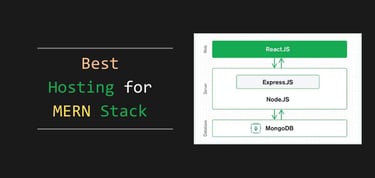


The best hosting for MERN stack applications is found on cloud server platforms based on virtualization. Using MongoDB with JavaScript tools like Express.js, React, and Node.js is known as MERN stack development. These are best practices for coding modern websites and mobile applications.
By communicating with MongoDB via APIs, coders can build React apps that outperform LAMP stack solutions which rely on MySQL queries and PHP code to operate. Here, we identify the best hosting providers for MERN stack requirements.
1. DigitalOcean + Cloudways
With Cloudways, MERN stack developers can use React with any programming language to support MongoDB. System administrators are required to use command-line tools to install npm. The VM hosting options on DigitalOcean hardware are the cheapest overall for MERN stack requirements. The platform includes a suite of valuable tools for backups and security.


- Choose from AWS, Google Cloud, DigitalOcean, Vultr, or Linode
- Auto-healing servers with automated backups and free SSL
- 60+ global data center locations
- Pay-as-you-go — no contracts, cancel anytime
- 3-day free trial, no credit card required
- Get started on Cloudways now.


Jack Wallen


If you can’t beat the cloud provider behemoths, offer their infrastructure as a service. Cloudways gives customers their choice of cloud platform: AWS, Google, Linode, Digital Ocean, or Vultr.
Go to full review »| Disk Space | CPU | RAM | Setup Time |
| 20 GB SSD – 4 TB SSD | 1 – 96 cores | 1 GB – 384 GB | 8 minutes |
To install MongoDB with Express.js and Node.js, use sudo commands on Ubuntu with Apache as your base server configuration. Cloudways simplifies switching to NGINX if your apps need it. Utilize npm and React with your JavaScript skills, and integrate with other scripts or microservices. The free Cloudflare CDN integration boosts download speeds significantly.
2. AWS + Cloudways
If you prefer to host on AWS cloud hardware rather than DigitalOcean, Cloudways hosting plans offer a range of base configurations with managed platform services. The AWS plans start with 2 vCPU plus 2GB RAM VMs and scale up to 4 vCPU plus 16GB RAM. For MERN stack hosting, these plans support high levels of API processing with access to 20 GB of storage.
- Choose from AWS, Google Cloud, DigitalOcean, Vultr, or Linode
- Auto-healing servers with automated backups and free SSL
- 60+ global data center locations
- Pay-as-you-go — no contracts, cancel anytime
- 3-day free trial, no credit card required
- Get started on Cloudways now.
Jack Wallen
If you can’t beat the cloud provider behemoths, offer their infrastructure as a service. Cloudways gives customers their choice of cloud platform: AWS, Google, Linode, Digital Ocean, or Vultr.
Go to full review »| Disk Space | CPU | RAM | Setup Time |
| 20 GB SSD – 4 TB SSD | 1 – 96 cores | 1 GB – 384 GB | 8 minutes |
The AWS plans at Cloudways include managed servers with support for unlimited domain names. Developers have root access to the web server configuration and can install the MERN stack components using command-line tools. The service maxes out at 2TB of monthly bandwidth. This solution is ideal for building microservice apps with React and custom APIs.
3. Linode + Cloudways
Linode (integrating with Akamai) is another hardware option that sits in the midrange between public cloud and budget host costs. Cloudways offers the same managed cloud control panel across all of its hardware partners. Linode pricing starts at around $14 per month for 1 vCPU + 1GB of RAM on managed cloud servers. This is the same price as DigitalOcean VMs on the platform.
- Choose from AWS, Google Cloud, DigitalOcean, Vultr, or Linode
- Auto-healing servers with automated backups and free SSL
- 60+ global data center locations
- Pay-as-you-go — no contracts, cancel anytime
- 3-day free trial, no credit card required
- Get started on Cloudways now.
Jack Wallen
If you can’t beat the cloud provider behemoths, offer their infrastructure as a service. Cloudways gives customers their choice of cloud platform: AWS, Google, Linode, Digital Ocean, or Vultr.
Go to full review »| Disk Space | CPU | RAM | Setup Time |
| 20 GB SSD – 4 TB SSD | 1 – 96 cores | 1 GB – 384 GB | 8 minutes |
With Linode hosting through Cloudways, MERN stack developers get the same managed cloud control panel for domain settings and server configurations with easy-to-install, full-stack options. Linode is owned by Akamai, so the primary advantage of using its hardware and datacenter locations is low-cost, high-performance web hosting for React apps that is easier to use.
4. Google Cloud Platform + Hostinger
Hostinger offers a managed VPS platform and cloud servers which can be fully customized by systems administrators for the requirements of MERN stack development. Cloud servers scale up to 6 vCPUs and support a maximum of 300 websites. Scripts run on fast NVMe SSD storage which significantly improves the page speed performance of React applications.

- Managed cloud with 20x more resources than shared hosting
- LiteSpeed servers, NVMe SSD, and built-in CDN
- Daily backups, DDoS protection, and free SSL
- Free website migration — usually done in 20 minutes
- Priority 24/7 support via live chat
- Get started on Hostinger now.


Sead Fadilpasic


Hostinger offers something for everyone. From two cloud hosting plans that leverage the company’s global datacenter presence to a premium service powered by Google Cloud Platform, you’re sure to find what you need.
Go to full review »| Disk Space | CPU | RAM | Setup Time |
| 50 GB NVMe – 400 GB NVMe | 4 – 12 cores | 4 – 12 GB | 6 minutes |
Google Cloud Platform powers Hostinger’s cloud servers, and users can choose from datacenters across the US, Asia, Europe, and Latin America. Hostinger VPS plans scale up to 8 dedicated vCPU cores. And Hostinger’s KVM 8 VPS plan is one of the best deals available.
5. Heroku
Heroku, owned by Salesforce since 2010, is a go-to platform for creating React apps with Salesforce Lightning tools. While it’s best known for PostgreSQL development, Heroku’s cloud server platform also features nearly 8,000 build packs for quick web server installations. It’s a top pick for professional React app hosting.

Heroku supports a variety of professional programming languages and offers solutions for metrics, security, DevOps, and version control. It’s tailored for enterprise-level software development. Consider using Heroku for MERN stack hosting if you’re collaborating with major brands or require Salesforce CRM integration.
6. Netlify
Netlify is a hosting company that has led the adoption of JAMstack solutions with Static Site Generators (SSGs). JAMstack refers to JavaScript, APIs, and Markup language, which can be used in React development to build the most advanced features required for modern websites and mobile apps. Netlify can support any MERN stack programming requirements.

If you’re diving into professional JavaScript development, Netlify provides an array of frameworks like Next, Nuxt, Vue, Gatsby, and React for you to experiment with. You can either develop your own APIs using Node.js or incorporate third-party services as needed. Netlify offers a unique, cloud-native platform tailored to your MERN stack needs, featuring unified data management and a visual editor for simplicity.
7. Vercel
Vercel is another best-in-class solution for professional JavaScript development with React. The company is managed by the original development team behind the Next.js framework. You can support MERN, MEAN, and MEVN stack requirements for advanced projects with version control across Agile teams that work with GitHub, GitLab, Azure DevOps Pipelines, and Bitbucket.

Vercel partners with some of the world’s top brands, providing excellent React application hosting. Their serverless infrastructure runs on a global edge network, allowing the platform to scale flexibly and handle enterprise-level traffic seamlessly. Vercel is committed to ensuring 100% uptime, offering real-time metrics so you can keep an eye on your web and mobile apps.
What Is a MERN Stack?
The MERN stack comprises of MongoDB, Express.js, React, and Node.js. This powerful combination facilitates advanced website and mobile app development using JavaScript. While most shared and managed cloud hosting offer access to LAMP servers, developers can install the MERN components together using VM or VPS hosting plans.
The MERN stack is versatile and can run on Apache, NGINX, or other server software. Developers can select the OS and server framework that best match their project needs, which might involve managing domain names, IP addresses, email accounts, databases, programming languages, and web server settings. It’s advisable to install the MERN stack components on a VM or VPS plan using command line tools or control panel software.
Components of the MERN Stack:
- MongoDB: A NoSQL database that uses JSON APIs to query indexed information.
- Express.js: A backend framework for creating RESTful APIs that work with Node.js.
- React: A set of JavaScript components that create the framework for web and mobile apps.
- Node.js: A web server extension that allows for server-side scripting with JavaScript.
MongoDB is also widely adopted outside the MERN, MEVN, or MEAN stack development community. These combinations differ based on the specific use of React, Vue, or Angular for web application development. React Native delivers code for Apple and Android devices, as well as progressive web apps (PWAs) and desktop applications. Not all projects use MongoDB with React, but there is a large community of MERN stack developers with many educational resources.
Which Is the Best Hosting Service for MERN Stack?
Picking the right MERN stack hosting largely depends on your team’s programming needs as you work on web or mobile apps with React. npm grants you access to over 5 million JavaScript packages, allowing you to create complex app functionalities. React pairs well with Ionic, Next.js, Gatsby, and other deployment options for both web and mobile apps, enabling seamless integration with open-source JavaScript tools or TypeScript programming.
The Node.js components require specific port configuration on a web server. Static JavaScript frameworks such as jQuery and AJAX are useful for building menus and GUIs for websites, but Node.js initially emerged as a solution for building event-driven apps with real-time updates.
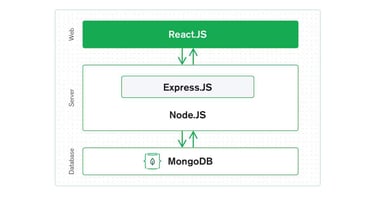
The MERN stack is more efficient with server resources compared to PHP applications that rely heavily on SQL queries. It primarily operates through APIs for both web and mobile development. To begin your journey, focus on installing and configuring the Express.js components.
The MERN stack can be installed with Webuzo using a browser-based control panel solution on VPS plans. This is an optional add-on to some VPS hosting services and is the easiest way to install all of the components of a MERN stack server, including MongoDB in different versions.
Otherwise, you can use Helm charts with containers and Git for version control across teams to install the MERN stack. VPS plans, multi-cluster servers, and elastic web server platforms are best for MERN stack hosting. High-traffic web and mobile apps can use Kubernetes for scalability if you exceed VPS and VM resources. Web hosting for MERN stack on VM plans is best for web development. VM platforms also provide the most flexibility for custom programming teams.
How Do I Host My MERN Stack Project?
If you are not using a GUI solution like Webuzo to install the MERN stack components on your VPS or VM server, you can implement a solution such as Bitnami’s MEAN stack with GitHub version control for React. You need an experienced systems administrator to build and maintain the MERN stack web server components on your virtual machines or VPS plans. For example:

To dive into the MERN stack, start by establishing an SSH connection to your server. Run the necessary commands to create the “mern” directory and kick off a React app.
Then create a folder for the server:

Once npm is set up on your server instance, you can utilize it to add all the other MERN stack components necessary for any cloud function using JavaScript and JSON APIs:

Finish the initial setup with the commands:

Having installed MongoDB, Express, and Node.js on your server with their default components, you’re all set to embark on your development journey. You’ll need to delve into systems administration to fine-tune MongoDB and Express.js to perfectly match your coding needs.
It’s wise to invest in a dedicated hosting service if you’re planning to hire MERN stack developer teams for intricate web applications. For Ionic web development and mobile apps, take advantage of the company’s app platform, which offers cloud hosting and complimentary themes for React.
It is best if you can follow the guides published by MongoDB and React if you want to learn advanced system administration for MERN stack hosting on VM and VPS plans. Express.js knowledge is also critical to building a Node.js application. Building a React application requires JavaScript programming language expertise, as well as systems administration for Node.js hosting. MongoDB Atlas also provides a free tier cluster server that you can use.
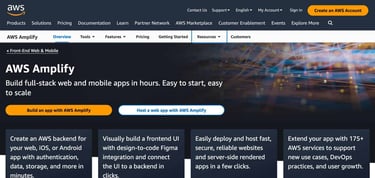
By connecting your team through Git, using platforms like GitHub or GitLab, you can host React app code, develop on your desktop, and push updates through a staging environment. This setup supports high-level development for web and mobile apps. You can build your web app on platforms like Amazon Web Services (AWS), Google Cloud, or Microsoft Azure, giving you access to specialized developer tools. For React, AWS Amplify stands out as the top public cloud platform.
Where Can I Host a MERN Stack App for Free?
JAMstack hosts are a great choice for free MERN stack application hosting. The top free MERN stack hosting providers include Netlify, Vercel, and Render. You can also use AWS Amplify’s free tier for a public cloud solution. Cloudways offers deployment options across AWS, Google Cloud, Linode, or DigitalOcean datacenters. Their managed stack tools are effective for optimizing billing resources in line with web traffic and API data processing needs.
When Heroku discontinued its free MERN stack hosting, many developers had to move their projects to new hosts. Hostinger’s plans with Google Cloud support are great for MERN app needs, and DigitalOcean’s hardware, available through Cloudways, offers another robust option. Opting for subscription-based VM or VPS hosting with your own MERN stack setup is another way to access free hosting, though typically only available through a 30-day trial. Meanwhile, Netlify and Vercel offer numerous free SSG hosting solutions.
Level Up React Skills with MERN Stack Hosting
Most hosting providers don’t offer hardware with MongoDB pre-installed. This means that as a MERN developer, you’ll need some basic systems administration skills. You’ll have to set up the tech stack using command-line tools or a control panel to install the necessary components for MERN stack web development on a server.
When you’re working with an EC2 instance alongside AWS S3 or a scalable Kubernetes hosting service, requirements become more complex. Using an app engine like Ionic can speed up the process of building and publishing apps to mobile platforms; however, it comes with a hefty monthly fee. Consider using AWS Lambda for support with serverless API code.
The best hosting plans for building React apps are VM plans or VPS plans. They allow you to control the environment with Helm charts. VPS plans allow you to use npm to install components with command-line access. Some VPS web hosting services offer Webuzo for management of the web server settings for JavaScript development, although it costs an extra subscription fee.
Your programming team’s specific needs should guide your choice of web hosting plans for the MERN stack. If you’re developing solo, it’s smart to try each option to find the perfect fit. We suggest building your apps on a desktop, moving them to a staging environment, and thoroughly testing your code before going live.
HostingAdvice.com is a free online resource that offers valuable content and comparison services to users. To keep this resource 100% free, we receive compensation from many of the offers listed on the site. Along with key review factors, this compensation may impact how and where products appear across the site (including, for example, the order in which they appear). HostingAdvice.com does not include the entire universe of available offers. Editorial opinions expressed on the site are strictly our own and are not provided, endorsed, or approved by advertisers.
Our site is committed to publishing independent, accurate content guided by strict editorial guidelines. Before articles and reviews are published on our site, they undergo a thorough review process performed by a team of independent editors and subject-matter experts to ensure the content’s accuracy, timeliness, and impartiality. Our editorial team is separate and independent of our site’s advertisers, and the opinions they express on our site are their own. To read more about our team members and their editorial backgrounds, please visit our site’s About page.