




Your website’s traffic ebbs and flows depending on the time of day, week, or maybe even the time of year. A website selling ski gear will have a lot more visitors in the winter months than in the middle of July. Websites like these need hosting to support these seasons of high traffic.
The total amount of page hits per month for a website is vastly different from the total number of simultaneous users on a web server, and your hosting plan must seamlessly handle both to prevent costly downtime.
This how-to guide introduces the best hosting for high-traffic websites, including cloud, VPS, and dedicated server categories, so that you can support any number of site visitors.
- Navigate This Article:
Best Cloud Hosting Plans for High-Traffic Websites
Monthly page hits for a website don’t reveal when users visited or what server requests they made. This makes it a misleading statistic for web server support, especially when it comes to high-traffic WordPress hosting, social networking, or mobile app needs.
The total number of simultaneous users is what causes “slashdotting,” the crash of a web server or throttling of web hosting accounts at peak rates of user activity. Slashdotting occurs when sites go viral on social media or a link is shared to a popular blog or mass media website.
To avoid the dreaded slashdotting, check out one of the hosting providers below.
1. Kamatera.com


- Best for developers and devops teams needing full control
- Deploy in 60 seconds across 20 global data centers
- Fully customizable: 1–32 cores, 1–128 GB RAM, NVMe SSD
- Hourly or monthly billing — scale up or down anytime
- 99.95% uptime with built-in firewall and load balancing
- 30-day free trial, no charge if canceled
- Get started on Kamatera now.


Surajdeep Singh


Starting with more than 60 operating system images to choose from, Kamatera is a strong option for developers who know exactly what environment works best for their project. Customize your cloud server as needed and deploy in less than a minute.
Go to full review »| Disk Space | CPU | RAM | Setup Time |
| 20 GB NVMe – 4 TB NVMe | 1 – 32 cores | 1 GB – 128 GB | 5 minutes |
Kamatera cloud servers are available in high-performance configurations for the most demanding data processing requirements in production. You can choose how much system RAM, vCPUs, and SSD storage to include on each cloud server with fine-grained precision.
The configuration options at Kamatera scale from 1 to 32 vCPUs and up to 131 GB of RAM, sufficient for more than 90% of all websites in production. Try the Kamatera cloud server platform risk-free with a 30-day money-back guarantee and $100 in free credits.
2. IONOS.com

- Start with $200 in credit for your first month
- Intel Xeon processors, Linux or Windows, full root access
- Scale instances up or down with no downtime
- By-the-minute billing — only pay for what you use
- 99.99% uptime, ISO 27001-certified data centers
- Get started on IONOS now.

Christina Lewis


Boasting 99.998% platform availability, the popular cloud hosting services from IONOS deploy more than 2,500 virtual machines each week. Customers flock to the host for its cutting-edge hardware, georedundant network, and always-there support.
Go to full review »| Disk Space | CPU | RAM | Setup Time |
| 10 GB NVMe – 720 GB NVMe | 1 – 24 cores | 512 MB – 48 GB | 6 minutes |
IONOS Cloud is engineered for the most demanding requirements of enterprise companies with complete virtual datacenter solutions. Administrators can deploy Compute Engine (VMs) or Kubernetes cluster servers with elastic automation for cloud-native software development.
IONOS Cloud includes a managed database and S3-compatible block storage options with transparent pay-as-you-go billing. IONOS Cloud competes with the service products of AWS, Google Cloud, and Digital Ocean based on low-cost, high-performance cloud hardware.

- Choose from AWS, Google Cloud, DigitalOcean, Vultr, or Linode
- Auto-healing servers with automated backups and free SSL
- 60+ global data center locations
- Pay-as-you-go — no contracts, cancel anytime
- 3-day free trial, no credit card required
- Get started on Cloudways now.

Jack Wallen


If you can’t beat the cloud provider behemoths, offer their infrastructure as a service. Cloudways gives customers their choice of cloud platform: AWS, Google, Linode, Digital Ocean, or Vultr.
Go to full review »| Disk Space | CPU | RAM | Setup Time |
| 20 GB SSD – 4 TB SSD | 1 – 96 cores | 1 GB – 384 GB | 8 minutes |
Cloudways delivers a hybrid cloud platform that can deploy web server configurations across hardware options from Digital Ocean, Google Cloud, Linode, and AWS. Managed cloud hosting allows developers to publish full-stack containers supporting multiple datacenters.
If your major concern is maintaining uptime guarantees for high-traffic websites and mobile applications, Cloudways is a cheap option for WordPress and other CMS-driven projects. The platform supports custom PHP development requirements with free Cloudflare CDN caching.

- 99.9999% uptime guarantee with redundant network
- Hourly billing — deploy and scale in seconds
- Full root access, custom OS or 1-click app installs
- Nightly backups, snapshots, and enterprise firewall included
- 24/7/365 support with free website migration
- Get started on Hostwinds now.
Jack Wallen
Hostwinds provides supremely scalable and customizable options for the savvy developer or site owner. Customers can customize their cloud environment or choose pre-built configurations optimized to run apps like WordPress, Drupal, and others.
Go to full review »| Disk Space | CPU | RAM | Setup Time |
| 30 GB SSD – 750 GB SSD | 1 – 16 cores | 1 – 96 GB | 6 minutes |
The Hostwinds cloud server platform uses snapshots for one-click deployment of web servers running Debian, Fedora, CentOS, Ubuntu, and Windows operating systems. Plans bill by the hour with configurations from 1 to 16 vCPUs and up to 96 GB of installed system RAM.
Hostwinds cloud servers have high-speed bandwidth, enterprise-grade firewalls, and nightly backups of fully automated websites. Load balancing solutions allow publishers to build multi-cluster servers across datacenters with pay-as-you-go billing rates.
5. Bluehost.com

- Top hardware powered by OpenStack and KVM
- Instant provisioning and guaranteed resources
- Options for 2-4 CPU cores and up to 8GB of RAM
- Quickly manage and scale resources
- Dedicated IP and domain privacy available
- Get started on Bluehost now.


Sead Fadilpasic


If you’ve outgrown shared hosting, Bluehost’s platform is a great option. The company makes the transition from its own shared plans seamless. Enjoy the dynamic resources and streamlined monitoring through the host’s intuitive…
Go to full review »| Disk Space | CPU | RAM | Setup Time |
| 50 GB – 450 GB NVMe | 1 – 8 cores | 2 GB – 16 GB DDR5 | 6 minutes |
Bluehost cloud servers are a mid-range option to consider when evaluating VPS and multi-cluster server options. Bluehost servers range from about $150 to $300 per month if you need to guarantee a maximum peak CPU availability for high-traffic websites.
For these prices, web publishers receive genuine Intel hardware with quad-core or octa-core configurations. RAM specs range from 8 GB to 30 GB. Bluehost includes a free monthly license for the use of cPanel on its platform with managed WordPress hosting tools.
Best VPS Hosting Plans for High-Traffic Websites
The standout benefits of VPS hosting for high-traffic sites include burstable RAM and the ability to scale hardware resources in real time. VPS plans are the budget-friendly option if your sites frequently handle hundreds or thousands of users at once and need to scale for millions of monthly page hits.
VPS plans are cheaper and functionally equivalent to using a dedicated server with the same resources. The main difference between a dedicated hosting plan is that VPS accounts run on multi-tenant hardware using a shared kernel.
If you’re using a shared hosting plan and are ready to upgrade, VPS hosting is for you.
6. Kamatera.com
- Best for developers: Fully customizable cloud VPS — choose your exact CPU, RAM, and storage
- Intel Xeon Platinum/Cascade Lake CPUs & NVMe SSD
- 20+ global data centers across 4 continents, with 99.95% uptime
- Hourly or monthly billing, only pay for what you use
- 30-day free trial with $100 credit — no commitment needed
- Get started on Kamatera now.


Surajdeep Singh
Backed by cutting-edge cloud computing technology, Kamatera adds instant and limitless scalability to the VPS hosting marketplace. Each cloud or virtual server is equipped with blazing-fast SSD storage and Intel’s latest Xeon Platinum/Cascade Lake, 2.7GHz+ CPUs.
Go to full review »| Disk Space | CPU | RAM | Setup Time |
| 20 GB NVMe – 4 TB NVMe | 1 – 32 cores | 1 GB – 128 GB | 5 minutes |
Kamatera cloud VPS servers are available in three tiers of managed services with affordable monthly prices. These units are designed for quick and easy deployment with options for Linux, Windows, or FreeBSD operating systems. You also get a choice of more than 18 datacenters.
Kamatera cloud servers are available in simple configurations for single-site deployments or multi-domain publishing with a dedicated IP address. NVMe SSD storage guarantees the fastest performance speeds for scripts and databases with reliable managed security.
7. IONOS.com
- Lowest entry price for VPS: no hidden fees, unlimited traffic, from $4.00/mo
- NVMe SSD storage, 1 Gbps connection, and 99.99% uptime
- Full root access with Linux or Windows — deploy in minutes
- Personal consultant assigned to every account after signup
- 30-day money-back guarantee and award-winning support
- Get started on IONOS now.

Christina Lewis
For an all-star player in the game of web hosting flexibility, look no further than the low-cost options from IONOS. The company’s vServers are a powerful VPS option that includes dedicated resources and unlimited traffic.
Go to full review »| Disk Space | CPU | RAM | Setup Time |
| 10 GB NVMe – 720 GB NVMe | 1 – 12 cores | 1 GB – 24 GB | 6 minutes |
IONOS VPS plans start at affordable prices of only $2 per month for one vCPU and one GB of RAM. SSD hardware is available at HDD storage costs, with an optional NVMe SSD storage upgrade available on plans for high performance. The maximum configuration options give you more than enough vCPUs and RAM to support a high-traffic site.
Even the IONOS VPS plans in the top range are incredibly affordable. Storage on the higher tier includes ample space and additional features. You can lock in the cheapest rates on VPS hosting plans with annual deals. If you choose monthly billing, you can cancel anytime to upgrade your hardware at cheaper rates.
8. Hosting.com

- AMD EPYC processors and NVMe SSD storage on all plans
- Full root access — install tools, containers, and custom stacks
- Choice of Ubuntu, Debian, or AlmaLinux with optional cPanel
- 10 global data centers with free CDN and 99.9% uptime SLA
- 24/7/365 in-house support — no outsourcing, no bots
- Get started on hosting.com now.
Christina Lewis
While hosting.com’s turbocharged shared hosting platform gives site owners ample room to grow, the company’s tech prowess is on full display with its portfolio of VPS options. Ranging from unmanaged, bare-metal environments to stress-free, fully managed space, hosting.com is sure to have the perfect option for your expanding online presence.
Go to full review »| Disk Space | CPU | RAM | Setup Time |
| 20 GB NVMe – 450 GB NVMe | 1 – 10 cores | 1 GB – 32 GB | 7 minutes |
Hosting.com has both Linux and Windows VPS plans available under your choice of managed or unmanaged platforms. Unmanaged VPS plans start at only $2.99 per month. Its higher-tiered plans scale significantly more with even greater processing power.
Managed VPS plans at hosting.com have more RAM & CPU cores installed from the start. You get a free CloudLinux installation bundled with a cPanel license. The Turbo server option includes NVMe SSD storage and low-density domain assignments for 20x faster performance.

- $0.01 for the first month using code HOSTINGADV
- Price locked for life, no renewal increases, ever
- Scale instantly by adding slices — each adds 1 CPU, 2 GB RAM, 40 GB SSD
- Linux or Windows with full root access, choice of data center
- 24/7 in-house support from an independently owned provider since 1999
- Get started on InterServer now.
Sead Fadilpasic
InterServer’s on-site datacenter and hands-on involvement with configuring and provisioning virtual private servers give customers a level of flexibility not seen with many other hosting providers. InterServer rations VPS and cloud resources through slices.
Go to full review »| Disk Space | CPU | RAM | Setup Time |
| 30 GB SSD – 480 GB SSD | 1 – 16 CPUs | 2 – 32 GB | 6 minutes |
Cloud VPS plans at InterServer start at prices as low as $6 per month. You can upgrade configurations in real time as your high-traffic website grows. Plus, InterServer Cloud VPS plans include a fully managed web server environment, meaning you can leave the complicated stuff to the pros.
With the InterServer platform, developers can install Windows or Linux servers with full-stack solutions for scripts. This allows you to bundle the OS, database, and programming language with all the extensions for Git version control to support remote team collaboration.
10. Bluehost.com
- Seamless migration from any Bluehost shared hosting plan
- Root access and easy multi-server management
- Ample RAID-1 storage and tons of bandwidth
- Each plan gets at least 2 dedicated IP addresses
- cPanel and WHM with root access
- Get started on Bluehost now.
Sead Fadilpasic
We love recommending Bluehost for its lifetime customer growth potential, meaning you can start with shared hosting and seamlessly scale to VPS hosting plans and beyond. The price versus performance is pretty unbeatable in the virtual hosting space, and Bluehost’s engineering team will kick off the customer relationship by instantly provisioning your server.
Go to full review »| Disk Space | CPU | RAM | Setup Time |
| 50 GB – 450 GB NVMe | 1 – 8 cores | 2 GB – 16 GB DDR5 | 6 minutes |
Bluehost VPS plans are a top option for an initial upgrade from shared hosting when websites become popular with user traffic. Web publishers receive dual-core and quad-core options with ample RAM and a free cPanel license for unlimited domains.
Managed VPS plans at Bluehost have expert security and WordPress development tools included in the package. Publishers of high-traffic websites receive plenty of SSD storage, unlimited monthly bandwidth, and 24/7/365 customer support through multiple channels.
Best Dedicated Hosting Plans for High-Traffic Websites
Dedicated server hosting plans support high-traffic websites and mobile applications with excess capacity for meeting traffic spikes. These servers deliver overall better performance at average user activity rates, too.
The main advantage of a dedicated server is having greater security and control than a shared environment. These features, combined with the amount of power a dedicated server has, make them ideal for large organizations. If this sounds right for you, take a look at the options below.
11. IONOS.com
- Best for teams wanting enterprise dedicated hardware at affordable prices
- AMD EPYC, Ryzen, and Intel Xeon — GPU servers also available
- Unlimited bandwidth, RAID included, up to 80 TB storage
- 99.995% server availability across 6 global data centers
- Every plan includes a dedicated personal consultant
- Get started on IONOS now.
Christina Lewis
If you need blazing-fast speed, optimum uptime, top-notch flexibility, and full control over the fate of your website the dedicated servers from IONOS have you covered. The company offers an assortment of entry-level, performance-focused, and business-class server options.
Go to full review »| Disk Space | CPU | RAM | Setup Time |
| 480 GB SSD – 4 TB SATA HDD | 4 – 32 cores | 16 GB – 256 GB | 7 minutes |
IONOS has some of the cheapest dedicated servers available. Its dedicated server plans bill by the hour depending on configurations and include maximum monthly rates for transparent costs. The company offers Intel Xeon and AMD CPUs with guaranteed single-tenant environments.
You can customize IONOS dedicated servers for any workload or budget. If you need guaranteed data processing power at the cheapest rates, take a look at the configuration options available.

- Best for businesses needing enterprise hardware with managed support
- Bare-metal or fully managed dedicated servers from $35/mo
- Intel Xeon to AMD EPYC, up to 16 cores and 192 GB DDR5 RAM
- Monarx security & 500 GB backup storage with Premier Care
- 24/7 Advanced Product Support from senior sysadmins
- 99.99% uptime SLA, up to 10 Gbps unmetered bandwidth
- Get started on InMotion now.

Dave McQuilling


InMotion Hosting offers amazingly fast and reliable dedicated hosting on market-leading hardware — making it an easy choice for anyone seeking a premium dedicated server host. From free SSDs to a fanatical support team, InMotion has all the bases covered for both small-scale and large-scale operations.
Go to full review »| Disk Space | CPU | RAM | Setup Time |
| 960 GB SSD – 7.68 TB NVMe | 4 – 16 cores | 16 GB – 192 GB DDR5 | 7 minutes |
InMotion Hosting dedicated servers are built on elite Intel hardware configurations. The plans include 10 to 100 unique cPanel licenses, which are ideal for reseller accounts or team collaboration for software development.
InMotion Hosting includes a security suite of SSL certificates, firewalls, anti-malware, anti-DDoS, and anti-virus scanning. You also get a free backup service with extra physical storage. The location of datacenters in the USA or EU includes guaranteed single-tenant use by IP address.
13. LiquidWeb.com

- Best for mission-critical sites needing fully managed dedicated hardware
- Save up to 50% for 2 months with this HostingAdvice offer
- Fully managed or self-managed — Linux or Windows
- PCI-ready environments with 99.99% uptime SLA
- cPanel, Plesk, or InterWorx — 24/7 Heroic Support® included
- Get started on Liquid Web now.
Christina Lewis
Liquid Web’s strong suit is managed dedicated server hosting. The company owns and operates five state-of-the-art datacenters in the US and Europe works tirelessly to build and maintain custom solutions for added performance and security.
Go to full review »| Disk Space | CPU | RAM | Setup Time |
| 383 GB SSD – 3.2 TB SSD | 4 – 32 cores | 12 GB – 192 GB | 8 minutes |
Liquid Web is best known for its high-touch managed hosting services, including its robust dedicated server offering. The Liquid Web dedicated server plans include base configurations of Intel Turbo hardware that you can upgrade with additional RAM and storage as required by your project or organization.
Upgrades deliver as much as 192 GB of DDR-4 RAM to units. You can add up to 8 extra SSD storage drives as well. Liquid Web’s dedicated server plans will power the most demanding cloud software apps in production with prebuilt data compliance for PCI/HIPPA standards.
What Is a High-Traffic Website?
The definition of a high-traffic website is determined by the total number of simultaneous users at peak rates of platform activity and the total number of monthly page hits.
High-traffic WordPress sites have thousands of simultaneous users and average more than a million page hits per month. You can’t reliably support this level of traffic on a shared hosting plan. You need a higher-powered solution such as cloud, VPS, or dedicated hosting.
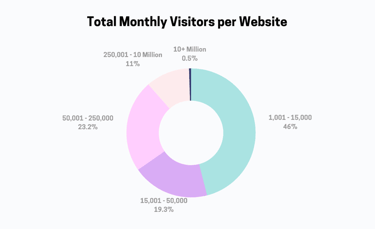
Caching is the first solution for WordPress websites and other CMS publishers with high traffic requirements. This can involve reverse proxy caching at the web server level with NGINX, Redis, or Varnish. Additionally, Memcached and Opcache tools can be fine-tuned to optimize the best performance for logged-in users making requests to the database.
A large eCommerce store or social networking site can have thousands (or millions) of users at peak rates of activity. When the data processing requirements exceed what a single dedicated server or VPS plan will support, publishers need to move to a scalable solution like Kubernetes.
A specialized WordPress hosting provider like ScalaHosting, InMotion Hosting, or WPX Hosting may offer multi-cluster servers as a mid-range option for supporting more traffic or simultaneous data processing capacity. Scalable WordPress hosting is more commonly achieved through virtualized resource allocation, i.e. adding more RAM or vCPUs to plans.
Which Type of Server Is Best for High-Traffic Websites?
Most websites can easily serve 1,000 page hits per day on shared hosting plans but will struggle with maintaining more than 100 simultaneous users. This is because the data processing, caching, and CDN requirements are different between the two types of user traffic. Thankfully, you can learn to optimize your web hosting for different types of activity.
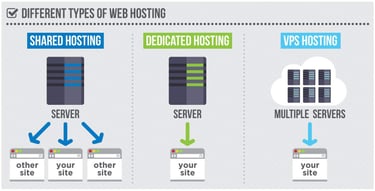
Web publishers and business owners with popular apps do not need to immediately change over to Kubernetes plans to support WordPress, Drupal, Magento, and other LAMP scripts. VPS and Dedicated server plans will scale up to 128 vCPUs and 256 GB of RAM on configurations, which is sufficient for most website owners.
If your scripts crash during peak activity rates using single-unit hardware, you may consider adopting a scalable solution with elasticity like AWS EC2 or Kubernetes servers with automated node-cluster configurations.
Discuss the available platform options with your web hosting company first, if you are on managed WordPress hosting plans, to make the most efficient use of resources.
Cloud Servers
Cloud servers with elastic automation can span across more than one datacenter for better performance at peak user activity rates than a single dedicated unit will provide. If one server node in a multi-cluster formation fails, the active web traffic is routed to available servers until the partition reboots.
Suppose peak rates exceed current web server capacity. In that case, elastic automation allows new server nodes to spin up on demand to meet high levels of user traffic without administrators needing manual intervention. This is how enterprise sites maintain uptime.
Definition: Cloud hosting uses a distributed network of virtual and physical servers to power websites or applications. This provides users with more scalability and flexibility for their resources since they have multiple servers to fall back on.
Virtual Private Servers
Virtual Private Server (VPS) plans allow for more RAM, vCPUs, and SSD/HDD storage to be added in real time to support higher levels of web traffic. These plans are not designed to operate in multi-cluster formatting with load-balancing. Still, they may integrate with CDN solutions for better performance at peak rates of anonymous user traffic.
Systems administrators will need to build custom web server caching solutions for their high-traffic websites to get better performance from hardware configurations before upgrading plans.
Definition: VPS stands for virtual private server. VPS hosting is when users share a single server but receive dedicated resources. Web hosts use virtualization technology to isolate server space and give users access to their own resources.
Dedicated Servers
Dedicated servers function nearly the same as VPS hosting plans with similar hardware configurations but guarantee single-tenant occupancy. While this is important to sustain support for high-traffic websites in production, dedicated servers can still fail to match peak user activity or unexpected traffic spikes.
If your dedicated server operates at more than 80% of total capacity at any point in time, consider an upgrade to a multi-cluster web server solution with elastic scalability for better processing support and sharding the database.
Definition: Dedicated hosting gives users an entire server to leverage for their needs. Users don’t share any resources and have access to a physical server. For this reason, dedicated server hosting is typically more expensive.
WordPress publishers can gain more support for high levels of web traffic by using managed services with load-balancing on datacenter requests and integrated webpage caching for anonymous users.
VPS and dedicated server plans support higher levels of traffic for users who are simultaneously logged in. Multi-cluster servers span multiple datacenters for more capacity than a single VPS or dedicated server configuration can manage, augmented by load-balancing and file caching across resources that will support higher levels of web traffic in production.
Can You Use Shared Hosting for a High-Traffic Website?
Some systems administrators can handle more than 1 million monthly page hits with managed WordPress hosting solutions by using W3 Total Cache with Cloudflare CDN integration. This configuration will remove most of the web traffic activity away from the root server, with throttling limits on data processing. However, it relies on serving static pages of web content to anonymous users.
Even with Memcached, Opcache, Varnish, Redis, NGINX, and other plugin caching solutions enabled on a managed WordPress hosting plan, the server will still crash if you have too many simultaneous logged-in users. A CDN cannot effectively mitigate this type of web traffic.

High-traffic WordPress hosting offers optimized webpage caching with equivalent resources to a dedicated hosting plan where access to trained datacenter engineering saves you money.
If most of your WordPress traffic is shown to anonymous users, it is much easier to support with page caching tools. Minimizing images, CSS stylesheets, and JavaScript files helps shared hosting publishers support higher web traffic on their hosting plans. The best WordPress hosting offers these services pre-installed with optimal configurations. Choose the platforms with the best customer support over live chat channels to rely on if issues arise.
What Makes a Web Host Fast?
A web hosting company employs qualified programmers and systems administrators to engineer managed hosting platforms with high-performance capabilities. Each web host may have different hardware, web server management options, and datacenter engineering behind their managed hosting platforms. All of these elements combine to make a web host fast.
The main features that contribute to the best web server performance are:
- Hardware: Elite web server configurations on multi-core processing units.
- Software: Optimized web server stack solutions are pre-installed on platforms.
- Datacenter: Load-balancing and webpage caching options are integrated.
- Web Traffic: Elastic scalability is automated with peaks or surges in activity.
Some of the critical elements to Turbo servers and other high-performance hardware solutions are low account density on multi-tenant hardware, which keeps servers from being overloaded with simultaneous requests.
Most web servers fail when operating above the 90% capacity threshold in production. Your units need to scale reliably before they become overloaded. You can accomplish this through multiple layers of performance optimization for CMS websites.
Which Hosting Plan Is Best for WordPress Sites With Unlimited Traffic?
The best web hosting plans for maintaining high-traffic WordPress sites come with extra system resource allocations and pre-installed caching services for web pages. Relying on expert datacenter engineering from a web hosting provider will save you the costs of complex system administration over time.

Look for VPS hosting plans to support high-traffic WordPress site requirements at Liquid Web, WP Engine, and hosting.com. These web hosts specialize in high-traffic website requirements without the elastic scalability of public cloud platforms. Dedicated server hosting cannot guarantee better performance for high-traffic WordPress sites if the datacenter engineering is optimized on a managed hosting service.
The best hosting products are managed cloud hosting platforms with priority customer support and live chat channels to contact experts when you need to add more resources like RAM, storage, or vCPUs to WordPress website plans.
Which Type of Hosting Is Best for Sites With Fluctuating Traffic?
Websites with peak activity greater than a single dedicated hosting plan or WordPress hosting provider will need to adopt elastic cloud server platforms like AWS EC2, ECS, or Kubernetes.
The best hosting plans will tap out at peak levels of user activity or with unexpected web traffic spikes, so you need to look for web hosts that can support high-traffic website requirements with automated hardware scalability to meet the needs of fluctuating user traffic. This involves database sharding and synchronization between nodes.

Luckily, most WordPress hosting providers include sufficient hardware and webpage caching resources to avoid the need to upgrade to elastic cloud platforms. Dedicated server hosting may be preferential to cloud servers to meet expected levels of web traffic for special events or promotions.
Look for a WordPress hosting provider with burstable RAM options, higher levels of hardware resource allocation, load balancing, and integrated webpage caching services before upgrading to cloud server plans.
Data Processing: Monitor Peak Rates of User Activity
In the world of web hosting, traffic can be variable and unpredictable at times. If you’re running an online business, staying online during peak usage is critical.
A shared hosting plan will only support a limited amount of data processing at peak rates of activity or during periods with the most active simultaneous users. VPS plans and dedicated servers allow for better overall performance at high rates of user traffic with guaranteed system resources. But still, if unexpected surges exceed the maximum capacity of your VPS or dedicated server, you will need to upgrade to the cloud for elastic scalability.
The best hosting for high-traffic websites is available on managed WordPress hosting plans with preconfigured caching and CDN options. These are the cheapest scalable WordPress hosting options available for high-traffic website requirements without database sharding in production.
You can count on these solutions to handle over 10 million page hits monthly with integrated webpage caching and content delivery networks (CDN). So, no matter how many visitors you have, your site will remain online.
HostingAdvice.com is a free online resource that offers valuable content and comparison services to users. To keep this resource 100% free, we receive compensation from many of the offers listed on the site. Along with key review factors, this compensation may impact how and where products appear across the site (including, for example, the order in which they appear). HostingAdvice.com does not include the entire universe of available offers. Editorial opinions expressed on the site are strictly our own and are not provided, endorsed, or approved by advertisers.
Our site is committed to publishing independent, accurate content guided by strict editorial guidelines. Before articles and reviews are published on our site, they undergo a thorough review process performed by a team of independent editors and subject-matter experts to ensure the content’s accuracy, timeliness, and impartiality. Our editorial team is separate and independent of our site’s advertisers, and the opinions they express on our site are their own. To read more about our team members and their editorial backgrounds, please visit our site’s About page.