




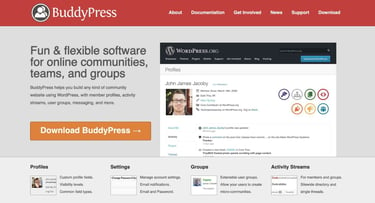
BuddyPress is a social networking distribution of WordPress that includes user profiles, groups, instant messaging, and other connectivity features. Hosting for BuddyPress has the same basic requirements as WP core, with the additional functionality provided by open-source plugins.
BuddyPress allows WordPress developers to save time in building websites by customizing the social networking functionality at the theme level with templates, custom CSS, and JavaScript. The BuddyPress distro is compatible with most other WordPress plugins for flexible use in apps.
BuddyPress is a WordPress distribution managed by Automattic, the parent company of the CMS. Automattic also produces WooCommerce and other plugins for WordPress, which have been adopted by a wide range of groups, from enterprises to small businesses. Read on for our recommendations of the best BuddyPress hosting services.
1. Bluehost
Bluehost is Automattic’s top choice for BuddyPress hosting, and its managed WordPress platform includes a free Cloudflare CDN account. Developers can install BuddyPress with bbPress to add forums to the community or create subdomain testing environments for code.


- Best for WordPress: WordPress.org’s longest-running recommended host since 2005
- 0.35s average load time — independently verified by WPShout
- AI builds your complete WordPress site in under 60 seconds
- Yoast SEO, NVMe SSD, WAF, and daily malware scans
- 24/7 WordPress experts — under 2-minute average response
- Get started on Bluehost now.


Sead Fadilpasic


Bluehost’s WordPress hosting packages are aimed at first-time site owners and personal bloggers. These services come at a premium compared to the standard Bluehost web hosting (basic shared hosting) plans, but the WordPress optimization and platform-specific resources are arguably worth the cost.
Go to full review »| Money Back Guarantee | Disk Space | Domain Name | Setup Time |
| 30 days | 10 – 100 GB NVMe SSD | FREE (1 year) | 7 minutes |
Available Plans at Bluehost:
| Basic Plan: | $2.95 monthly — 1 Website + 10 GB of SSD Storage & Chat Support |
| Choice Plus Plan: | $5.45 monthly — 3 Websites + 40 GB SSD Storage & Backups |
| Online Store Plan: | $9.95 monthly — 3 Websites + 40 GB SSD Storage & Data Analytics |
| Pro Plan: | $13.95 monthly — 5 Websites + 100 GB SSD Storage & Phone Support |
Bluehost recommends using the Be Social theme with BuddyPress to optimize the display and add Facebook commenting features to your communities. All new accounts include a free domain name registration at Bluehost and guaranteed privacy for the WHOIS records.
2. Hosting.com
Hosting.com tops the list of BuddyPress web hosting companies due to its extensive support for the distribution at prices that start at only $2.99 per month for a single site. BuddyPress developers are provided with tools like Elementor, Divi, BeaverBuilder, and BoldGrid.
 | ★★★★★ /5.0 |

- Preinstalled WordPress with optimized plugin
- 24/7/365 support via chat, email, and phone
- Free and easy site migration
- 99.9% uptime commitment
- Get started on hosting.com now »
| Starting Price/Mo. | $2.99 |
Available Plans at hosting.com:
| Startup Plan: | $2.99 monthly — 100 GB SSD Storage + Free Site Migration |
| Drive Plan: | $5.99 monthly — Unlimited Websites, SSD Storage, & Backups |
| Turbo Boost Servers: | $6.99 monthly — 20x Faster Servers + Unlimited NVMe SSD Storage |
| Turbo Max Servers: | $14.99 monthly — 20x Faster Servers + 5x More Server Resources |
Hosting.com will pre-install BuddyPress with an optimized runtime environment for WordPress. The LAMP server environment is administered through cPanel, the most widely used solution in shared web hosting. Hosting.com experts manage platform security so you can focus on running your BuddyPress forum.
3. SiteGround
SiteGround offers a one-click WordPress installation option where you can easily add the BuddyPress plugin set through the administration section. In case you have any issues or questions, SiteGround provides a collection of easy-to-use tutorials and guides for installation.

- Best for performance: WordPress sites average 78% faster speeds after migrating to SiteGround
- Free AI agent manages your WordPress site via simple chat
- Smart WAF, AI bot protection & geo-distributed backups
- Free staging, WP-CLI, SSH, Git, and one-click migrations
- 4.9/5 Trustpilot — 98% customer satisfaction for 10+ years
- Get started on SiteGround now.


Lynn Cadet


Want a hassle-free, WordPress-optimized hosting service? SiteGround has thought of everything you need to get your site up and running.
Go to full review »| Money Back Guarantee | Disk Space | Domain Name | Setup Time |
| 30 days | 10 GB SSD – 100 GB Google Cloud SSD | FREE (1 Year) | 6 minutes |
Available Plans at SiteGround:
| Startup Plan: | $2.99 monthly — 1 Website + 10 GB Storage & Unmetered Traffic |
| GrowBig Plan: | $4.99 monthly — Unlimited Websites + 20 GB Storage & Backups |
| GoGeek Plan: | $7.99 monthly — Unlimited Websites + 40 GB Storage & Migration |
SiteGround customers receive free domain name registration, SSL certificates for all listed domains, and developer tools like WP-CLI pre-installed for managing WordPress with a command line interface. The platform includes integrated caching and a free CDN option.
4. Hostinger
Hostinger is a popular budget hosting option for customers looking to get the maximum resources for the cost of their monthly hosting plan. You won’t find many cheaper offers online. All of Hostinger’s plans include a free domain name, unlimited bandwidth, and an email server.

- Best overall value: The most complete managed WordPress hosting at this price
- Kodee AI Agent manages your WordPress site via simple chat
- LiteSpeed servers boost site speed by up to 40%
- WAF, malware scanner, DDoS protection, and auto-updates
- Free migrations — 85% completed in under 5 minutes
- Get started on Hostinger now.
Sead Fadilpasic
As much as we love WordPress, one of our biggest pet peeves is when hosting providers exploit the popularity of the world’s most-used content management system by offering so-called WordPress hosting that, in reality, is exactly the same as the host’s shared server plans. Fortunately, Hostinger’s ultra-fast infrastructure and easy access to SSL certificates and backups sets up the company to outperform the vast majority of the violators of our admittedly made-up rule.
Go to full review »| Money Back Guarantee | Disk Space | Domain Name | Setup Time |
| 30 days | 20 GB SSD – 100 GB NVMe | FREE (1 year) | 4 minutes |
Available Plans at Hostinger:
| Premium Plan: | $2.49 monthly — 100 Websites + 100 GB SSD Storage & Domain |
| Business Plan: | $3.69 monthly — 100 Websites + 200 GB NVMe SSD Storage & CDN |
| Cloud Startup Plan: | $8.99 monthly — 300 Websites + 200 GB NVMe Storage & IP Address |
BuddyPress hosting is cheap and easy at Hostinger. You can install WordPress on any registered domain name or subdomain address, and the installer will create the MySQL database for you. You can add the BuddyPress plugin and support hundreds of WordPress sites online.
5. InMotion Hosting
Every WordPress hosting plan at InMotion Hosting includes a free domain name registration, SSL certificates for every domain, and NVMe SSD storage capacity. Developers can also host code written in Python, ASP.NET, Ruby, and Node.js using InMotion Hosting’s shared hardware.

- UltraStack NVMe hosting makes WordPress up to 40x faster
- Automatic WordPress updates, free SSL, and malware scans
- Free domain, free cPanel, and free expert migration on all plans
- BoldGrid drag-and-drop WordPress builder with free themes
- 90-day money-back guarantee and 24/7 award-winning human support
- Get started on InMotion now.

Dave McQuilling


InMotion Hosting, long known for affordable and high-performance shared hosting options, entered the WordPress space with a solid option built upon the company’s reputation for great support and reliability. Build on an all-SSD infrastructure, InMotion’s inherently quick speeds make the infrastructure a perfect fit for delivering rapid WordPress page loads.
Go to full review »| Money Back Guarantee | Disk Space | Domain Name | Setup Time |
| 90 days | 100 – 300 GB NVMe SSD | FREE (1 year) | 5 minutes |
Available Plans at InMotion Hosting:
| WP Core Plan: | $3.29 monthly — 2 Websites + 100 GB NVMe Storage & Backups |
| WP Launch Plan: | $8.99 monthly — 25 Websites + Unlimited NVMe Storage & Caching |
| WP Power Servers: | $6.75 monthly — Unlimited Websites & NVMe Storage + 30x Speeds |
| WP Pro Servers: | $12.75 monthly — Unlimited Websites & NVMe Storage + 40x Speeds |
If you have a high-traffic BuddyPress website, consider the i-Platform at InMotion Hosting to run your production apps on VPS with fixed resource allocation. The i-Platform managed plans range from $7 to $21 per month with Apache, NGINX, Redis, and dedicated PHP workers.
6. DreamHost
DreamHost is one of the oldest and most well-respected retail web hosting companies offering shared LAMP servers to clients for WordPress hosting. Its managed DreamPress distribution competes with WP Engine as a fully optimized runtime environment for the CMS.

- One of only three WordPress.org officially recommended hosts
- Free handcrafted starter website built by DreamHost experts
- Remixer AI builder, NVMe SSD, and daily automated backups
- Free domain privacy for life — included with every domain
- 100% in-house support including WordPress core contributors
- Get started on DreamHost now.

Christina Lewis


One of only three hosting providers recommended by the WordPress Core team, DreamHost has actively contributed to the WordPress community for more than a decade. The company’s platform is optimized for the incredibly popular content management system, and plans include easy setup, automated updates and backups, unlimited bandwidth, and 24/7 specialized support.
Go to full review »| Money Back Guarantee | Disk Space | Domain Name | Setup Time |
| 30 days | 25 – 100 GB NVMe SSD | FREE (1 year) | 4 minutes |
Available Plans at DreamHost:
| WordPress Plans: | From $2.59 monthly — Cheap & Easy-to-Use + Free Domain Name |
| DreamPress Plans: | Starting at $16.95 monthly — Optimized Distro + Website Caching |
| VPS WordPress: | From $10 monthly — Virtual Private Server Solutions that Scale |
DreamHost makes it easy to install and maintain a BuddyPress site over time. Customers get a free domain name, unlimited email addresses, SSL certificates, and other perks with every plan. DreamHost WP plans offer the expertise of its data center engineers at a lower price than DIY.
7. HostGator
HostGator is another of the stalwarts in the industry, with more than 20 years of service and millions of domains published. HostGator offers three WordPress hosting plans with the CMS pre-installed. You will have to add the BuddyPress package through the WP Admin section of the installation.

- WordPress installed with 1-click updates & malware scanning
- Free domain, free SSL, and Cloudflare CDN included
- Unmetered bandwidth and 99.9% uptime guarantee
- cPanel with SSH, MySQL, and PHP 8.2 support
- 24/7/365 support via phone and live chat
- Get started on HostGator now.
Lynn Cadet
HostGator is great for all things shared hosting, and application-specific services — such as the classic one-click-install WordPress hosting — are no exception. The team recently updated its already clean and intuitive HostGator cPanel dashboard, wherein users can find a myriad of free apps and scripts to install, including WordPress.
Go to full review »| Money Back Guarantee | Disk Space | Domain Name | Setup Time |
| 30 days | 20 GB SSD – 100 GB SSD | FREE (1 year) | 4 minutes |
Available Plans at HostGator:
| Baby Plan: | $4.50 monthly — 2 Websites + 20 GB SSD Storage + Cloudflare CDN |
| Business Plan: | $6.25 monthly — 3 Websites + 40 GB SSD Storage + Daily Backups |
| Pro Plan: | $13.95 monthly — 5 Websites + 100 GB SSD Storage + 5 vCPUs |
HostGator includes a free domain for the plan’s first year, free SSL certificates for every domain, and unmetered bandwidth. The free Cloudflare CDN offer, anti-malware scanning, and domain privacy are standard on every HostGator WordPress plan with cPanel administration.
8. Cloudways
Cloudways has a unique system that allows anyone to run BuddyPress sites on AWS, Google Cloud, or DigitalOcean servers. Cloudways provides each client with a virtual machine (VM) where WordPress operates according to fixed hardware allocations for RAM, CPUs, and storage.

- Exclusive 40% off for 4 months for HostingAdvice readers
- Managed WordPress Hosting on DigitalOcean, AWS, GCP, Vultr, or Akamai
- AI Copilot for instant troubleshooting and server insights
- Free unlimited WordPress migrations via Cloudways plugin
- Pay-as-you-go — no contracts, scale up or down anytime
- Get started on Cloudways now.

Jack Wallen


Cloudways makes it simple to kick-start a WordPress site or app hosted in a cloud environment. During the initial setup, we were given a choice of a single- or multi-site installation of the latest WordPress version — complete with Cloudways optimizations — or a no-frills WP install.
Go to full review »| Money Back Guarantee | Disk Space | Domain Name | Setup Time |
| 3-day FREE trial | 20 GB SSD – 4 TB SSD | New or Transfer | 8 minutes |
Available Plans at Cloudways:
| DigitalOcean Plan: | $14 monthly — 1 GB RAM, 1 vCPU Core + 25 GB NVMe Storage |
| AWS Plan: | $38.56 monthly — 2 GB RAM, 2 vCPU Core + 20 GB NVMe Storage |
| Google Cloud Plan: | $37.45 monthly — 1.75 GB RAM, 1 CPU Core + 20 GB NVMe Storage |
The Cloudways WordPress plans support 35 data centers with an optimized runtime stack for BuddyPress sites, including caching and Cloudflare CDN options. Cloudways offers servers with seamless vertical scaling, dedicated firewalls, and NVMe storage capacity.
9. IONOS
IONOS offers managed and unmanaged WordPress hosting plans at equivalent pricing, where customers can install BuddyPress as a plugin. This allows developers to take advantage of the low prices on IONOS hardware and managed cloud services.

- Just $1/month for 12 months
- Free domain registration and up to 500 email accounts
- Setup wizard helps with installation, suggests themes, and installs plugins
- FREE automatic WP updates and DDoS protection
- SSD drives, NGINX, and guaranteed RAM for page load speed
- Get started on IONOS now.
Christina Lewis
You’re not alone if you’re looking for fine-tuned optimizations and security enhancements specifically tailored around WordPress. Hundreds of hosts are clamoring to offer the best services for the world’s most popular content management system, and IONOS is among the select group leading the way.
Go to full review »| Money Back Guarantee | Disk Space | Domain Name | Setup Time |
| 30 days | 25 GB SSD – 75 GB SSD | FREE (1 year) | 5 minutes |
Available Plans at IONOS:
| Start Plan: | $4.50 monthly — 1 Site + 25 GB SSD Storage & 9 GB RAM |
| Grow Plan: | $5.50 monthly — 1 Site + 50 GB SSD Storage & 15 GB RAM |
| Boost Plan: | $11 monthly — 1 Site + 75 GB SSD Storage & 20 GB RAM |
In comparison, most web hosting companies with VPS plans charge much higher prices for configurations with the level of RAM that IONOS provides. This will give your website a performance advantage over other solutions that should assist Google PageSpeed scores.
10. HostArmada
HostArmada’s cloud hosting plans for WordPress publishers include the PicoSpace theme which is compatible with BuddyPress and WooCommerce. Developers can add any web builder framework of their choice to build sites. HostArmada offers free SSL, caching, and daily backups.

- 1-click WordPress installation
- Fast and redundant SSD storage
- FREE website migration and SSL encryption
- Up to 21 daily backups
- FREE domain registration
- Get started on HostArmada now.
Christina Lewis
HostArmada provides a simple user interface for WordPress users to manage and build their websites. Not only do users get an easy-to-navigate client dashboard for their domain and account needs, but they also get a free cPanel control panel to develop their WordPress site.
Go to full review »| Money Back Guarantee | Disk Space | Domain Name | Setup Time |
| 45 days | 15 GB SSD – 40 GB SSD | FREE (1 year) | 3 minutes |
Available Plans at HostArmada:
| Start Dock Plan: | $2.49 monthly — NGINX Servers + 2 GB RAM & 15 GB SSD Storage |
| Web Warp Plan: | $4.11 monthly — NGINX Servers + 4 GB RAM & 30 GB SSD Storage |
| Speed Reaper Plan: | $4.94 monthly — LiteSpeed Servers + 6 GB RAM & 40 GB Storage |
The Start Dock plan at HostArmada will only support one site and has a two-CPU allocation, while the Web Warp plan supports unlimited domains and is a great deal. The choice here is between NGINX and LiteSpeed servers with BuddyPress. The Speed Reaper plan has six CPUs in total.
11. Liquid Web
Liquid Web offers managed WordPress hosting plans that include scalability for up to 250 high-traffic WordPress sites. If you are looking to run BuddyPress in an optimized cloud hardware environment, Liquid Web’s managed WordPress plans are top-of-the-line.

- Speedy WP-optimized hosting
- FREE Object Cache Pro, image compression, and CDN
- Supports up to 250 WordPress sites
- Automatic plugin updates and performance monitoring
- FREE premium plugins and advanced PHP support
- Get started on Liquid Web now.
Christina Lewis
Among the latest additions to the company’s product portfolio, Liquid Web’s managed WordPress and WooCommerce hosting solutions is delivered by WordPress specialists. The fully managed support rids site owners of the responsibility of maintaining core installs and updates, as well as monitoring the server infrastructure.
Go to full review »| Money Back Guarantee | Disk Space | Domain Name | Setup Time |
| 30 days | 15 GB – 800 GB | New or Transfer | 5 minutes |
Available Plans at Liquid Web:
| Launch Plan: | $5 monthly — 1 Site + 15 GB Storage & 2 TB Bandwidth |
| Thrive Plan: | $20 monthly — 3 Sites + 25 GB Storage & 2.5 TB Bandwidth |
| Elevate Plan: | $81.67 monthly — 5 Sites + 40 GB Storage & 3 TB Bandwidth |
Liquid Web maintains a curated list of WordPress plugins on its managed cloud plans with dedicated and autoscaled PHP workers for BuddyPress. Enterprise sites can scale up to 60 dedicated and 70 autoscaled workers for the fastest processing of user I/O requests.
What Is BuddyPress Hosting?
BuddyPress hosting involves the deployment of a specialized social networking distribution of WordPress on shared, VPS, dedicated, or cloud servers.
WordPress will run on Windows or Linux with Apache, IIS, NGINX, LiteSpeed, and other web server frameworks. The code is written primarily in PHP and requires a MySQL-compatible database to install the script.
Web hosting companies offer shared hosting with cPanel, virtual private server (VPS) plans with isolated environments for full-stack development, managed WordPress plans where the script is pre-installed and updated, and provide optimized runtime environments for the script and database. There are also options for systems administration and integrated caching.
Which Is the Best WordPress Hosting Provider?
The plans provided by hosting.com are the best for BuddyPress developers as they also include a suite of template builders for WordPress and a free WordPress theme. Most web hosting companies only provide a pre-installed or one-click WordPress installation where you must add the BuddyPress theme from a professional marketplace or open-source design team.

- Cloudflare Enterprise CDN and dual WAF on all plans
- AMD EPYC NVMe — performance guaranteed or 1 year free
- Free WP Rocket and Object Cache Pro on select plans
- Free migrations on every plan with zero downtime
- 97% satisfaction — under 1 minute average response time
- Get started on hosting.com now.
Christina Lewis
As experts in performance optimization, hosting.com is a top choice for powering resource-heavy WordPress websites. The company offers shared or managed plans for the ultra-popular content management system, with the benefits extending to Joomla, Drupal, and other platforms.
Go to full review »| Money Back Guarantee | Disk Space | Domain Name | Setup Time |
| 30 days | 20 GB – 200 GB NVMe | New or Transfer | 5 minutes |
You can easily extend a WordPress website with the BuddyPress plugin suite and a BuddyPress WordPress theme. Ensure your web host provides these (instead of buying from the download market) to save the most on the plan’s cost.
A curated WordPress plugin suite is also helpful to developers when building a social network with community plugins. The BuddyPress docs are available online to learn more about the distro.
How Much Does BuddyPress Cost?
Automattic has released BuddyPress under open-source licensing terms, making it free for commercial or non-commercial purposes. There is no actual cost for the software. You can build a community website with BuddyPress that’s easy to manage on a cheap WordPress VPS or shared hosting plan. The cost should be from $3 to $12 per month.
When building a social network, the developer cost is much higher than the hosting cost. This encourages the use of professional themes and builder templates in DIY design. You can customize activity streams, user profiles, and online community plugins to the requirements of any group for information and discussion with a WordPress site and BuddyPress.
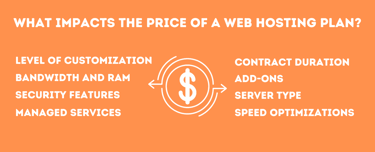
WordPress security at the web host should be a significant concern, although most companies have a good reputation here. Security breaches can cost more than development to businesses running a WordPress site with the best BuddyPress plugins pre-tested by the developers.
Which Type of Server Is Best for WordPress?
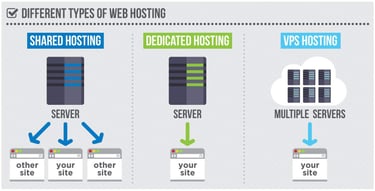
Most self-publishers and small businesses can publish their websites easily with WordPress on shared hosting plans without needing a dedicated server. The main feature of VPS hosting plans is that you get an isolated environment for full-stack customization.
You can run NGINX, Apache, or LiteSpeed servers with different databases and caching utilities to make BuddyPress websites perform at peak rates on the hardware. The approach of managed WordPress plans is to save publishers the time and effort of DIY VPS configurations with a complete PaaS solution.
Shared Servers
A web hosting service that supports WordPress on shared servers can install BuddyPress in just a few clicks. Many shared server frameworks are optimized for WordPress hosting with the best BuddyPress themes found on the download market.
The social login and BuddyPress registration options must be configured manually with developer knowledge. However, this is a low-code method of building a social network for a WordPress BuddyPress website.
Cloud Servers
If you have a high-traffic WordPress or BuddyPress website in production, cloud servers are a great upgrade, allowing sites to scale elastically with their user demand. This is frequently used by mobile apps running WordPress or sites with BuddyPress featured members who are influencers with a large following.
WooCommerce hosting is also compatible with BuddyPress, so using those cloud servers to build a BuddyPress community with WordPress social login is possible. Bitnami offers a full-stack WordPress profile for containers.
Virtual Private Servers
Suppose you run support forums with bbPress or a community site. In that case, a VPS plan will dedicate more resources to your app in production than is usually available on shared hosting plans.
Managed VPS plans are easiest, as the web hosting company provides and maintains the data center engineering over time with security upgrades. Unmanaged VPS plans are best when you need extensive customization for full-stack development requirements in programming. Consider a VPS plan for high-traffic social networking sites.
Dedicated Servers
Most WordPress publishers do not require a dedicated server or can get equivalent configurations at lower prices on VPS plans. The biggest demand for dedicated servers is in businesses that require the physical isolation of hardware.
Businesses that typically require a dedicated server have switched to cloud servers to maintain more control over elastic scalability. Some multi-user blogs and eCommerce sites may find it affordable to use dedicated servers for the fastest response times. However, CDN caching will usually benchmark faster at capacity than dedicated servers that fail most frequently at peak usage rates.
In summary, whether or not your BuddyPress site needs shared, VPS, cloud, or dedicated hosting should depend on your website’s traffic in production. The requirements of the WordPress dashboard are met by all of the web hosts listed above and are recommended for community site building with BuddyPress. You still need some developer skills to put it together.
BuddyPress: Software Development Requirements
A stock BuddyPress installation will give any organization a good, well-tested, open-source codebase to build a social network at no cost. Yet, it also takes quite a bit of developer time to set it up. Ensure every feature you need for the group operations or application functionality is installed. Don’t install a feature unless you absolutely need it to save on web server resources. A host with a free theme and site builder can save you an extra $50 on downloads.
A BuddyPress site with many simultaneous users will require an upgrade from shared to VPS hosting. WordPress is built to scale with caching on the web server and through a content delivery network (CDN) for the fastest speeds. There has been some debate between Apache, NGINX, and LiteSpeed servers for WordPress performance speeds where benchmarks still favor Apache. LiteSpeed with Redis and Varnish Cache may be an even faster configuration.
Use subdomains to test your code on different web server configurations for the best performance for BuddyPress themes and community websites. The best practice for team development is to set up version control through Git for the PHP and JavaScript programmers working on a project. Make sure your web host is up to date on the latest versions of PHP, MariaDB, and SSL certificates to keep your BuddyPress site secure and user data safe.
HostingAdvice.com is a free online resource that offers valuable content and comparison services to users. To keep this resource 100% free, we receive compensation from many of the offers listed on the site. Along with key review factors, this compensation may impact how and where products appear across the site (including, for example, the order in which they appear). HostingAdvice.com does not include the entire universe of available offers. Editorial opinions expressed on the site are strictly our own and are not provided, endorsed, or approved by advertisers.
Our site is committed to publishing independent, accurate content guided by strict editorial guidelines. Before articles and reviews are published on our site, they undergo a thorough review process performed by a team of independent editors and subject-matter experts to ensure the content’s accuracy, timeliness, and impartiality. Our editorial team is separate and independent of our site’s advertisers, and the opinions they express on our site are their own. To read more about our team members and their editorial backgrounds, please visit our site’s About page.