

Estimating your cloud hosting costs is daunting. With the pay-as-you-go pricing model, it’s difficult to anticipate what your monthly bill will come out to, which leaves many project managers over or under-budgeting. Thankfully, cost estimator tools can help.
I find the AWS Pricing Calculator from Amazon the most reliable for estimating the cost of public cloud services on new projects. Developers can present cost-based alternatives to AWS EC2 or Amazon S3 hosting to clients as estimates to compare cloud hosting services.
To gauge the usefulness of the AWS Pricing Calculator, project managers need to add the cost of services used for development, like databases, ML processing, storage, compute, data transfer rates, and CDN integration, with the total cost of the hardware configuration.
This article will help you learn how to calculate the AWS hosting cost of hardware, software, and datacenter management services and present some cheaper alternatives that won’t break the bank.
Best Cheap AWS Alternatives — $4.00 to $4.69/Month
Most small business owners are able to manage their web development costs at extremely reliable rates by relying on open-source software solutions. This is the key to the popularity of the LAMP stack and the script solutions provided by apps like Softaculous on cPanel hosting.
When your eCommerce site gains popularity, any slight lag in page load times will lead to losing customer orders. Web publishers on cloud VPS and VM plans can build with GUI administration and version control using containers, challenging Amazon AWS on the total price of services.
Unless you specifically need the database, machine learning, and data analytics functionality offered by flagship AWS products, the best cheap Amazon Web Service alternatives are listed below.
1. Kamatera.com


- Best for developers and devops teams needing full control
- Deploy in 60 seconds across 20 global data centers
- Fully customizable: 1–32 cores, 1–128 GB RAM, NVMe SSD
- Hourly or monthly billing — scale up or down anytime
- 99.95% uptime with built-in firewall and load balancing
- 30-day free trial, no charge if canceled
- Get started on Kamatera now.


Surajdeep Singh


Starting with more than 60 operating system images to choose from, Kamatera is a strong option for developers who know exactly what environment works best for their project. Customize your cloud server as needed and deploy in less than a minute.
Go to full review »| Disk Space | CPU | RAM | Setup Time |
| 20 GB NVMe – 4 TB NVMe | 1 – 32 cores | 1 GB – 128 GB | 5 minutes |
Kamatera provides enterprise-grade cloud infrastructure, including HIPAA, PCI, and GDPR-compliant hardware. Once an app has scaled and become established in the marketplace, web publishers and business owners must pay more attention to cloud compliance issues.
As eCommerce and social networking companies grow, they must follow strict standards for managing user data. Kamatera’s datacenters compare to AWS in this area.
With 15 international datacenters, Kamatera uses load balancing and virtual routing on cloud servers ranging from one to 32 vCPUs. Kamatera’s managed cloud infrastructure is a lower-priced alternative to the AWS cost for running web servers in a global edge network with compliance with international laws relating to data privacy. Kamatera cloud servers scale to 132 GB of RAM and four TB of SSD storage, comparable to the Amazon LightSail platform.
2. IONOS.com

- Start with $200 in credit for your first month
- Intel Xeon processors, Linux or Windows, full root access
- Scale instances up or down with no downtime
- By-the-minute billing — only pay for what you use
- 99.99% uptime, ISO 27001-certified data centers
- Get started on IONOS now.

Christina Lewis


Boasting 99.998% platform availability, the popular cloud hosting services from IONOS deploy more than 2,500 virtual machines each week. Customers flock to the host for its cutting-edge hardware, georedundant network, and always-there support.
Go to full review »| Disk Space | CPU | RAM | Setup Time |
| 120 GB – 720 GB NVMe | 1 – 24 cores | 512 MB – 48 GB | 6 minutes |
IONOS offers web publishers the ability to host on shared, VPS, and cloud servers under the safety of a 30-day money-back guarantee. Hardware configurations like vCPUs, RAM, storage, and bandwidth speeds can be changed in real time on any VM plan. You can compare the total cost savings by using the AWS Pricing Calculator.
Although IONOS targets business publishers who need elite hardware, anyone can start publishing with prices as low as $1 per month. IONOS hosting packages include a domain name, business email, free SSL certificates, and many other options. IONOS is a great option if you are worried about AWS budgets on long-term web hosting projects.

- 99.9999% uptime guarantee with redundant network
- Hourly billing — deploy and scale in seconds
- Full root access, custom OS or 1-click app installs
- Nightly backups, snapshots, and enterprise firewall included
- 24/7/365 support with free website migration
- Get started on Hostwinds now.

Jack Wallen


Hostwinds provides supremely scalable and customizable options for the savvy developer or site owner. Customers can customize their cloud environment or choose pre-built configurations optimized to run apps like WordPress, Drupal, and others.
Go to full review »| Disk Space | CPU | RAM | Setup Time |
| 30 GB SSD – 750 GB SSD | 1 – 16 cores | 1 – 96 GB | 6 minutes |
Hostwinds options include shared, VPS, cloud, and dedicated server platforms on independently owned datacenter equipment. The company has different configurations on its shared and business hosting plans to support the needs of larger-sized projects.
The VPS platform at Hostwinds is pre-configured with support for both Linux and Windows servers. Plans are available under both managed and unmanaged terms.
Hostwinds cloud servers bill by the hour and dedicated servers scale to quad-core options. You should choose Hostwinds if you need independent hardware with engineering support and cannot afford the prices of reserved instances on the AWS cloud.

- Choose from AWS, Google Cloud, DigitalOcean, Vultr, or Linode
- Auto-healing servers with automated backups and free SSL
- 60+ global data center locations
- Pay-as-you-go — no contracts, cancel anytime
- 3-day free trial, no credit card required
- Get started on Cloudways now.
Jack Wallen
If you can’t beat the cloud provider behemoths, offer their infrastructure as a service. Cloudways gives customers their choice of cloud platform: AWS, Google, Linode, Digital Ocean, or Vultr.
Go to full review »| Disk Space | CPU | RAM | Setup Time |
| 25 GB SSD – 3840 GB SSD | 1 – 32 cores | 1 GB – 192 GB | 8 minutes |
Cloudways is a unique service that allows developers to deploy their code to AWS, Digital Ocean, or Google Cloud Platform under a managed server system. The Digital Ocean hardware is the cheapest, with configurations starting at one vCPU and one GB RAM. Use the AWS Cost Explorer to see how much you can save on services.
Cloudways experts manage the web server, database, and programming language updates required on your hardware over time, allowing developers to focus on building custom app code with less time allocated to cloud systems administration and DevOps. You can use each AWS, GCP, or Digital Ocean service directly with cost optimization for managed cloud services.
5. Bluehost.com

- Top hardware powered by OpenStack and KVM
- Instant provisioning and guaranteed resources
- Options for 2-4 CPU cores and up to 8GB of RAM
- Quickly manage and scale resources
- Dedicated IP and domain privacy available
- Get started on Bluehost now.


Sead Fadilpasic


If you’ve outgrown shared hosting, Bluehost’s platform is a great option. The company makes the transition from its own shared plans seamless. Enjoy the dynamic resources and streamlined monitoring through the host’s intuitive…
Go to full review »| Disk Space | CPU | RAM | Setup Time |
| 50 GB – 450 GB NVMe | 1 – 8 cores | 2 GB – 16 GB DDR5 | 6 minutes |
Bluehost is in many ways the polar opposite of AWS in web hosting. The company specializes in managed WordPress and WooCommerce hosting for small businesses, nonprofits, and individual developers on cPanel servers. Developers won’t find any equivalent to Amazon EC2 instances.
Most importantly, you won’t get lost in the complexity of a public cloud platform like GCP, Microsoft Azure, or AWS when using Bluehost. The cPanel interface is easy to use to add domains and new email addresses, with one-click installation of MySQL databases and open-source scripts available free on its pricing model.

- Managed cloud with 20x more resources than shared hosting
- LiteSpeed servers, NVMe SSD, and built-in CDN
- Daily backups, DDoS protection, and free SSL
- Free website migration — usually done in 20 minutes
- Priority 24/7 support via live chat
- Get started on Hostinger now.
Sead Fadilpasic
Hostinger offers something for everyone. From two cloud hosting plans that leverage the company’s global datacenter presence to a premium service powered by Google Cloud Platform, you’re sure to find what you need.
Go to full review »| Disk Space | CPU | RAM | Setup Time |
| 50 GB NVMe – 400 GB NVMe | 4 – 12 cores | 4 – 12 GB | 6 minutes |
A cheaper alternative to cPanel licensing can be found by using hPanel on a shared hosting account at Hostinger. Independent developers maintain all of the tools for MySQL database management on PHP servers, with no-code site building options provided as a bonus offer.
Hostinger plans include managed WordPress services for specialists and will support 100 to 300 websites for less than $10 per month. Hostinger plans include 100 to 200 GB of NVMe SSD storage, the fastest in the marketplace. You also get a free CDN service that compares to the Amazon CloudFront options on AWS cloud.

- Price-lock guarantee — your rate never increases at renewal
- Linux or Windows, with cPanel, DirectAdmin, or custom panel
- Self-healing cloud infrastructure with SSD storage
- Free SSL, DDoS protection, and 24/7 support included
- Pay $.01 the first month with HOSTINGADV coupon
- Get started on InterServer now.
Sead Fadilpasic
InterServer’s on-site datacenter and hands-on involvement with configuring and provisioning cloud servers give customers a level of flexibility not seen with many other hosting providers. InterServer rations its VPS and cloud resources through slices….
Go to full review »| Disk Space | CPU | RAM | Setup Time |
| 40 GB SSD – 1280 GB SSD | 1 – 16 CPUs | 2 – 64 GB | 6 minutes |
InterServer is another independent AWS alternative focusing on customer service to distinguish its shared, VPS, and dedicated server plans. Clients enjoy Linux and Windows Server support on every platform with a pledge of unlimited customer service. There is no extra data transfer cost like AWS infrastructure.
InterServer hosting is cheap, starting at $2.50, with many options for ASP.NET development. Its cloud VPS and storage server plans will provide cheaper alternatives to AWS S3 storage for developers bootstrapping new sites or mobile apps. Choose the Cloud VPS plan over a LightSail instance at AWS to save on hosting costs.
How Much Does AWS Hosting Cost?
For a fair comparison with independent cloud hosting plans, take a look at AWS LightSail. This is the AWS VPS hosting plan. Using the AWS Pricing Calculator, I was shocked to see a one vCPU, 500 MB RAM, and 20 GB storage plan on AWS priced at $80 per month with bandwidth on a three-year subscription plan.
Here is a breakdown of other common AWS hosting plan costs:
- The same LightSail VPS configuration with continual usage and a one-year commitment is only $20 per month.
- As a dedicated instance, the same plan bills at $1463 per month.
It is difficult to justify the dedicated pricing unless your project specifically requires an AWS hardware configuration at continual peak usage rates. On cloud hardware, I/O requests are load-balanced by AWS resources.
It is easy to see why AWS has not totally extinguished the independent web hosting industry with its cloud computing platform. HostingAdvice routinely highlights cloud VPS hosting plans with much better configurations at up to 95% cheaper prices. But what happens if we add SageMaker?
Running RStudio on SageMaker costs around $595 per month. Jupyter Notebooks are free, as are a suite of other data science resources for developers. SSL storage is expensive for ML at around $20 per month for 100 GB at AWS. The most significant cost with SageMaker is for the amount of data processed, which is about $100 p/TB on servers with and without GPUs.
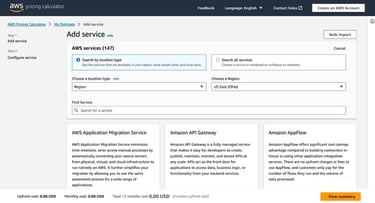
AWS EC2 instance hardware starts at around $50 monthly per node on shared hardware with two vCPUs, 500 MB RAM, EBS storage, and five TB bandwidth, but the ‘pay-as-you-go” price on the same plan is only $0.0042 per minute. Most businesses will save the most with this billing and AWS cost optimization.
There is so much variance in the pricing of AWS EC2 hardware that third-party auction services have emerged that sell a company’s unused dedicated resources to on-demand users at spot pricing discount rates that are lower than the AWS price per datacenter. This increases cost efficiency when purchasing spot instances but more unreliable services at peak rates.
According to a study by Columbia University:
“The data on hand shows the spot price exhibits significant fluctuations over time. They may be around one-tenth of the corresponding on-demand prices.”
In summary, you will need to combine compute, storage, machine learning, load balancing, database, CDN, and whatever other AWS services required for your project in the total bill. The best way is to use shared instances and “pay-as-you-go” billing for the lowest costs at AWS, avoiding the reserved instance pricing.
Pro tip: You can save even more through competitive bidding on spot instances through AWS Marketplace apps. AWS estimates “typical savings of 70% to 90%” by using spot instances over on-demand services. Spot pricing auctions can skyrocket when a datacenter is overloaded, so be sure to bid at minimum rates.
What Does AWS Do?
AWS provides web server hardware in hyperscale datacenters worldwide (IaaS), with a large number of developer tools like database frameworks, app builders (Amplify), and elastic web server frameworks (EC2/EKS). The company has pivoted heavily into Kubernetes (EKS) and container-based hosting services (ECS) with machine learning and data pipeline support.

AWS provides all the resources for enterprises to outsource their datacenter operations to remote facilities. They provide industry-leading database, storage, machine learning, and programming tools for enterprise software development requirements.
Cloud Database Options at AWS:
- Relational databases: Amazon RDS, Amazon Aurora, and Amazon Redshift
- Non-relational databases: Amazon DynamoDB, Amazon DocumentDB, Amazon Neptune, and Amazon QLDB
- In-memory databases: Amazon ElastiCache, Amazon MemoryDB, and Amazon Keyspaces
SMEs can run their apps cloud-native with event-driven architecture, managed Kubernetes servers, or orchestrated container hosting. These AWS solutions will scale to support the highest web traffic rates in the world. The company also has a “serverless” platform (Lambda), AWS Elastic Beanstalk, and AWS Fargate options.
Amazon Web Services provides MySQL database support with Aurora, PostgreSQL database support with Redshift, and NoSQL database support with DynamoDB. These solutions deliver IT solutions for almost every sector.
Like Google, AWS has even begun designing its own AI processing chips for cheaper pricing for machine learning, neural net, & LLM training requirements.
How Does AWS Pricing Work?
AWS pricing includes the total package of database subscription, compute, storage, and bandwidth on a variable web server configuration. Pricing increases on hardware when you increase the amount of RAM, vCPUs, storage, and bandwidth associated with a VM.
On-demand hardware is billed under the “pay-as-you-go” approach with a pricing structure based on the web server configuration.
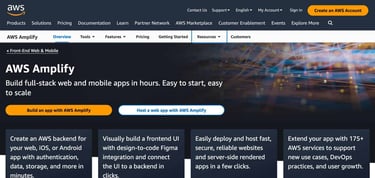
Pro tip: It is free to use many services like AWS Amplify with GitHub hosting, but it can be difficult to navigate through the AWS storage options and their pricing tiers when prototyping new apps.
There is a wide gap between the cost of shared hardware and dedicated instances at AWS. And pricing is dependent on your website’s size and purpose.
For example:
- High-traffic websites with millions of simultaneous users can regularly use AWS resources for their apps without concern about hardware availability or servers failing and going offline. But, there is a high cost for data transfer.
- Low-traffic websites without users can be hosted for free on AWS if they keep on lower service tiers. This allows developers to build apps by accessing AWS platform tools for programmers without high up-front costs.
- Enterprise users in industry, finance, media, gaming, and government have different requirements by organization, while AWS seeks to provide software development and cloud hosting solutions for each sector.
There is no one-size-fits-all approach to estimating your AWS hosting costs, but following these tips will help you budget accordingly.
Can I Get AWS for Free?
AWS has three varieties of free tier billing: services that are always free, limited 12-month free trials, and promotional offers.
Startup companies can apply to the AWS Activate program for an average of $5,000 to $10,000 in AWS billing credits that can be applied to any service product. You can get sponsorship if you have valid corporate registration documents.
AWS free trials apply to compute, database, storage, containers, web and mobile apps, serverless, and machine learning resources.
Pro tip: Search the AWS Free Tier for the best cloud hosting offers.
What Features Do I Need In a Cloud Host?
The main feature to look for in a cloud host is access to enterprise-grade development tools in a hyper-scale datacenter. Public cloud hosts are defined by the scale of their operations. For example, AWS manages Netflix hosting, Google has the scale of YouTube, and Windows is a global OS solution.
The other top cloud hosts are IBM, Oracle, and Alibaba. These mega-cloud corporations are ideal for technical teams and developers needing advanced features.
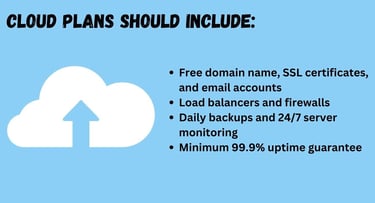
For most publishers running a WordPress site or blog, a cheap cloud-based plan from a web hosting company will do the trick. You should check for the following features:
- Free domain name, SSL certificates, and email accounts
- Load balancers and firewalls
- Daily backups and 24/7 server monitoring
- Minimum 99.9% uptime guarantee
The other features you look for will depend on what you plan to do with your site. For example, if you’re hosting a WordPress blog, you should also look for a host with a one-click WordPress installation and a free CDN.
Rely on AWS for the Latest Cloud Innovation
It’s rare for individuals or businesses to need the power of AWS. Most websites and applications will be well-supported by an affordable cloud hosting plan.
The main reason to adopt AWS is when your website traffic will exceed the maximum settings of a single VPS or VM cloud server. Then you can look into Kubernetes (EKS) and ECS. Some developers may have success on AWS with multi-datacenter installations and cluster server configurations. These can also be load-balanced or connected with real-time data analytics.
Other projects will be required to adopt AWS because the requirements include Redshift or DynamoDB, or the site owner wants the apps to run on EC2 with elastic scale for supporting social media promotions and holiday sales. Microservice apps running on APIs with AWS Lambda Serverless hardware can scale without any container orchestration required at all.
Startups should adopt AWS platform tools to produce SaaS applications that compete with established industries or disrupt traditional methods of IT management. The SageMaker platform on AWS is industry-leading in data science and machine learning tools.
If you are not coding startup apps or entertaining enterprise traffic levels, use a budget cloud server instead.
HostingAdvice.com is a free online resource that offers valuable content and comparison services to users. To keep this resource 100% free, we receive compensation from many of the offers listed on the site. Along with key review factors, this compensation may impact how and where products appear across the site (including, for example, the order in which they appear). HostingAdvice.com does not include the entire universe of available offers. Editorial opinions expressed on the site are strictly our own and are not provided, endorsed, or approved by advertisers.
Our site is committed to publishing independent, accurate content guided by strict editorial guidelines. Before articles and reviews are published on our site, they undergo a thorough review process performed by a team of independent editors and subject-matter experts to ensure the content’s accuracy, timeliness, and impartiality. Our editorial team is separate and independent of our site’s advertisers, and the opinions they express on our site are their own. To read more about our team members and their editorial backgrounds, please visit our site’s About page.