Key Takeaways
- Canva’s Visual Suite 2.0 adds long-overdue improvements to its website builder — and it’s far more capable than its earlier, single-page version.
- The update is also part of the broader, undeniable trend of “vibe coding,” or turning to SaaS platforms that let users build websites with minimal coding.
Canva debuted its updated design suite, Visual Suite 2.0, at this year’s Canva Create introducing new features like data-powered spreadsheets, Magic Studio enhancements, and Canva AI and Code. But one of the tools that’s possibly the most transformed — Canva Websites — deserved its own segment of the keynote.

Visual Suite 2.0’s new features basically turn Canva into another low-code website builder. Not only does this further prove that user experience is a top priority in the web-building space, it also means that Canva will likely lure in the same types of users who might’ve otherwise gone to the big platforms, like Wix and Squarespace.
What’s New Inside Canva Websites
Although Visual Suite 2.0 centers around individual tools and features, it also delivers some major upgrades to Canva Websites. The bones were always there: Even before the update, the builder was appealing to low-code users because it was a free, easy way to create single-page sites.
It’s as one Reddit user, u/Livid-Vacation-1155, put it: “I don’t have time to learn all the intricacies of Word[P]ress to make the design look like I want, and we don’t have the need to pay someone to build a website for us just yet.”
With Visual Suite 2.0, Canva Websites taps directly into the platform’s broader ecosystem, which lets users generate AI-written copy, build interactive widgets, and embed tools from Magic Studio, Docs, and Sheets. It’s also free to use (with some Premium limitations) and includes a Canva subdomain.
What Brought Canva Here
Naturally, Canva’s changes didn’t come out of nowhere. Throughout the keynote, the Canva team emphasized that these features were built because users were constantly asking for them.
And what they asked for lines up perfectly with the “vibe coding” movement, which makes it nearly effortless for both beginners and developers to generate apps and websites.
Canva isn’t even a web builder — and that’s how strong the pressure is now: User demands to simplify creation and automate complexity are so widespread that even non-market players like Canva want in on the action.
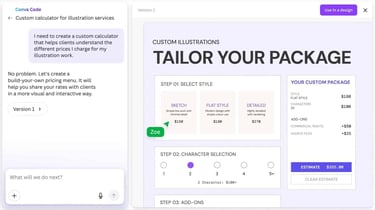
But even this website upgrade stays faithful to the original demographic. While it’s great for anyone who wants a fun, creative, but simple experience, YouTuber Wayne Fick noted there are plenty of website tools missing: no built-in shopping carts, form builders, or blogs.
“If you love the Canva ecosystem and you just want a quick way to publish a few beautiful, branded pages, Canva Websites are a great option,” said Fick. “Canva Websites are definitely not a replacement for something like Squarespace, but they do give you a fast, flexible way to create an online presence without leaving Canva or needing to learn another tool.”
Users also can’t export their site elsewhere — similar to Wix — meaning they’re locked in and can’t take their code with them. While that’s fine for simple projects, it could be a problem for small businesses that need more flexibility or advanced functionality.
While Canva isn’t trying to be the next Wix, it is pitching to the same growing crowd of people who want to build something with tech without having to learn that tech.